
Registration
- Follow the link in your email invitation, to create a unique password (your email address is your username)
- Log in to the timesheet portal – https://timesheets.driverhire.co.uk
- Agree the Terms & Conditions (you only need to agree to these terms once)
You can watch this short video if you need help setting up your online account.

Completing Timesheets
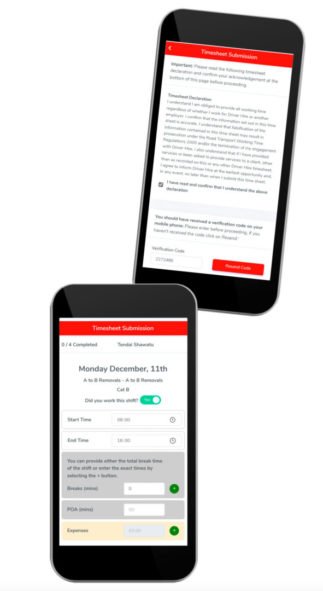
- Log in to the Driver Hire Timesheets portal at https://timesheets.driverhire.co.uk, select your week and click complete your timesheets.
- Tick the declaration box and insert the verification code that is sent to you via text (SMS). This acts as your electronic signature for each timesheet you submit
- Complete your timesheets. Enter the details for the shift(s) you worked, then click the ‘Submit Timesheet and Continue’ button
- If you worked for any other agencies, click the ‘Add Other Hours’ button to record these details
- Log out – happy driving! You will be notified by email if you have any more timesheets to complete
Questions
How do I login to submit my timesheets?
New Users
You can sign in to the Online Timesheets portal using the activation email you have been sent. If you cannot find your activation email, try searching your inbox for: ‘Get Started with Driver Hire Online Timesheets – Activate Your Account’. Also check your Junk and Spam folders.
Existing Users
If you have used Online Timesheets before, simply sign in with your email address and the password you previously set.
If you have issues logging in, you can reset your password from the login page using the “Forgot your password?” link. Alternatively, contact your Driver Hire office who can send you a password reset email.
What do the various statuses mean?
- Awaiting Completion – the timesheet has not been submitted by the candidate or Driver Hire Office yet.
- Verification Requested – the timesheet has been submitted by the Candidate or Driver Hire Office and is awaiting the approval of the Client.
- Verified – The timesheet has been submitted and approved by the customer.
Who do I contact if I have any issues?
In the event of an issue with the online timesheet tool, please contact your Driver Hire Office.
Will I be notified when I have a timesheet to complete?
Yes, your Driver Hire office can configure the frequency of your notifications. Your notification preference options are:
- Immediately – As soon as a timesheet is ready for you to fill in, you get a text.
- Daily – Once every day at 8am, if you have a timesheet, you will get a text.
- Weekly – On one chosen day of the week, you will get a text. You will only receive one text, even if you worked multiple shifts in the week.
If you need to complete a timesheet now, please go to the timesheets portal at: https://timesheets.driverhire.co.uk